programming-GPTs
4. Vector search & Question Answering
Another very popular application of the Large Language Models is question answering. Unlike summarization that can be solved with a fixed context, answering questions can be a moving target.
This is why we will investigate methods to extend the context with additional tools such as search, and introduce a special kind of search called similarity search over a vector database of embeddings.
A lot of new concepts we will present in this chapter. But before we do, let’s look at a method called Map Rerank that is very close to the ones covered in the previous chapter.
4.1. Map Rerank
If you only have a single but long document that you want to feed as a source to the LLM to answer your question, you could consider the Map Rerank method.
This method, suited for question-answer tasks rather than summarization, involves splitting the document, posing questions to each chunk, and ranking the answers based on confidence scores. It’s effective for single-answer questions but does not combine information across chunks.
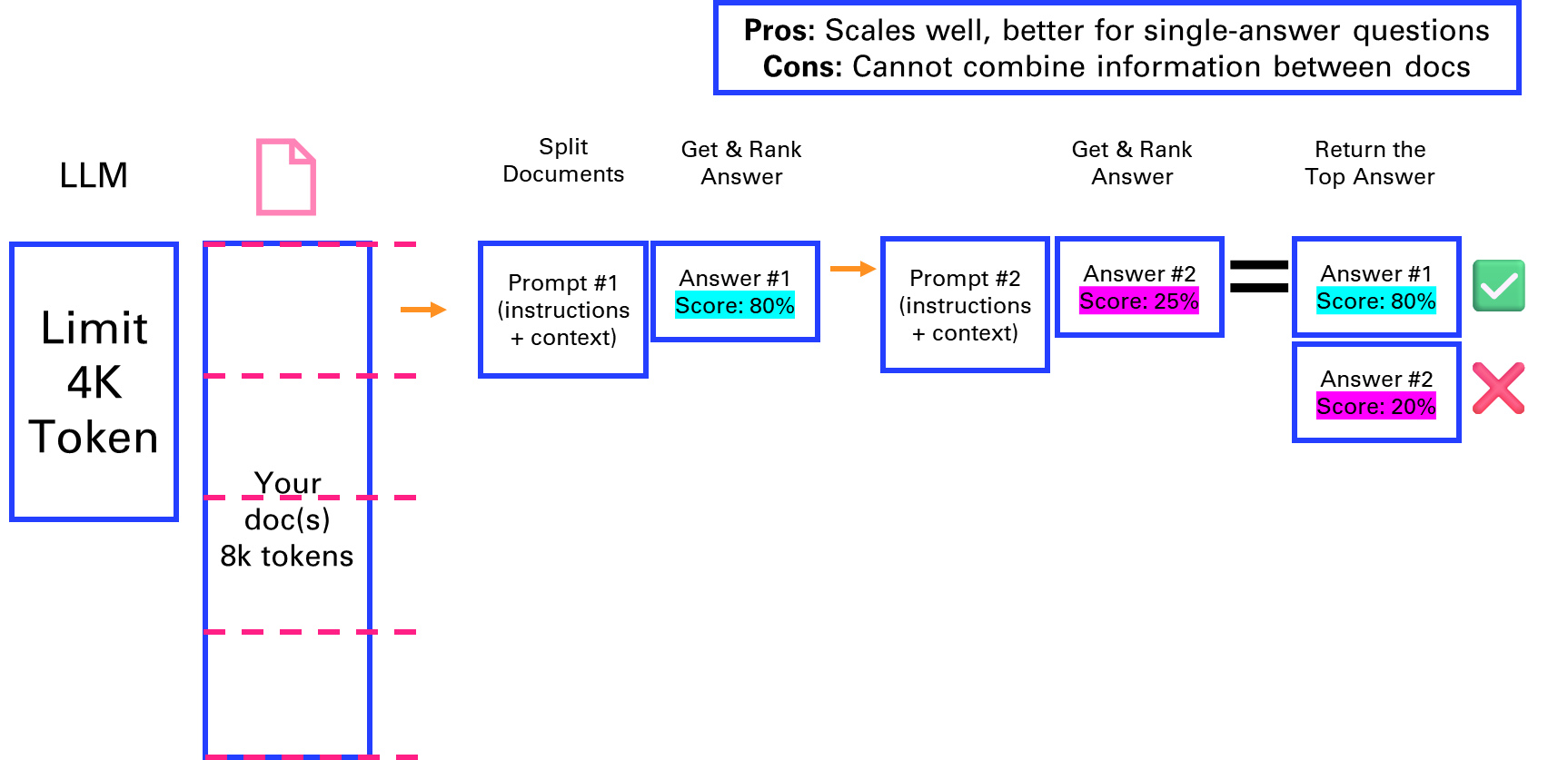
Figure 4‑1 Map Rerank to answer a question over a long document
4.2. Retrieval-Augmented Generation
The previous approach of Map Rerank that consists in asking questions to each section of a document isn’t optimal, as the number of requests to the LLM grows proportionally with the length of the doc. Another approach which consists in only retrieving the meaningful context for the request to the LLM is called Retrieval-Augmented Generation.
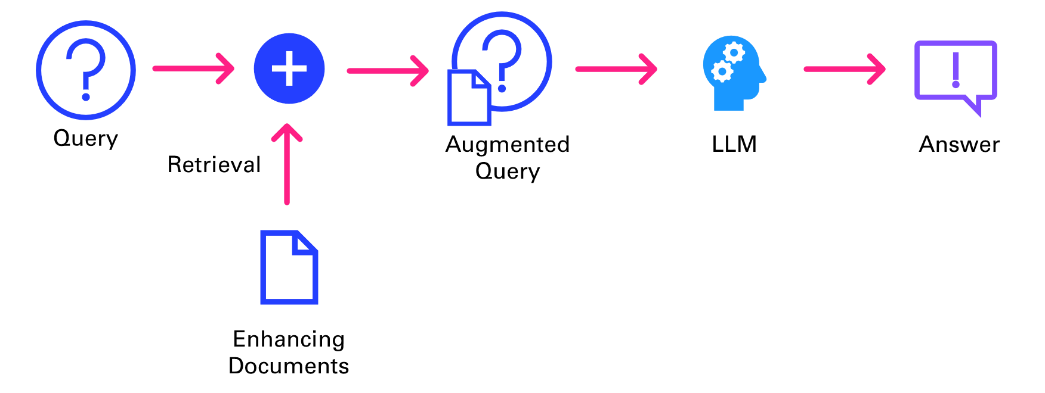
Figure 4‑2 Retrieval Augmented Generation workflow
As described in Figure 4-2, the query isn’t directly answered be the LLM. It first goes through an information retrieval system to pull the relevant context that will be fed to the LLM alongside the original query, to deliver an answer grounded in an extended knowledge base.
Traditional search
One of the first applications of ChatGPT was to answer questions that we previously were searching on the internet, via a search engine like Google. After all, a large language model is nothing more than a (very) compressed version of the internet, as it is the corpus on which they are primarily trained.
In this chapter, we will implement a very simple search tool that will input information from Google into our ChatGPT request. This way, the chatbot will be able to answer news related questions such as “Who is the CEO of Twitter?”.
from openai import OpenAI
openai = OpenAI()
def ask(question):
    completion = openai.chat.completions.create(
        model="gpt-4o-mini",
        messages=[{"role": "user", "content": question}]
        )
    return completion.choices[0].message.content

ask(prompt)
'As of September 2021, the CEO of Twitter is Jack Dorsey.'
ChatGPT is at least taking the precaution of stating the date of its recollection. But if we check on Google, we can see that things have changed quite a bit at Twitter since 2021 (even the name).
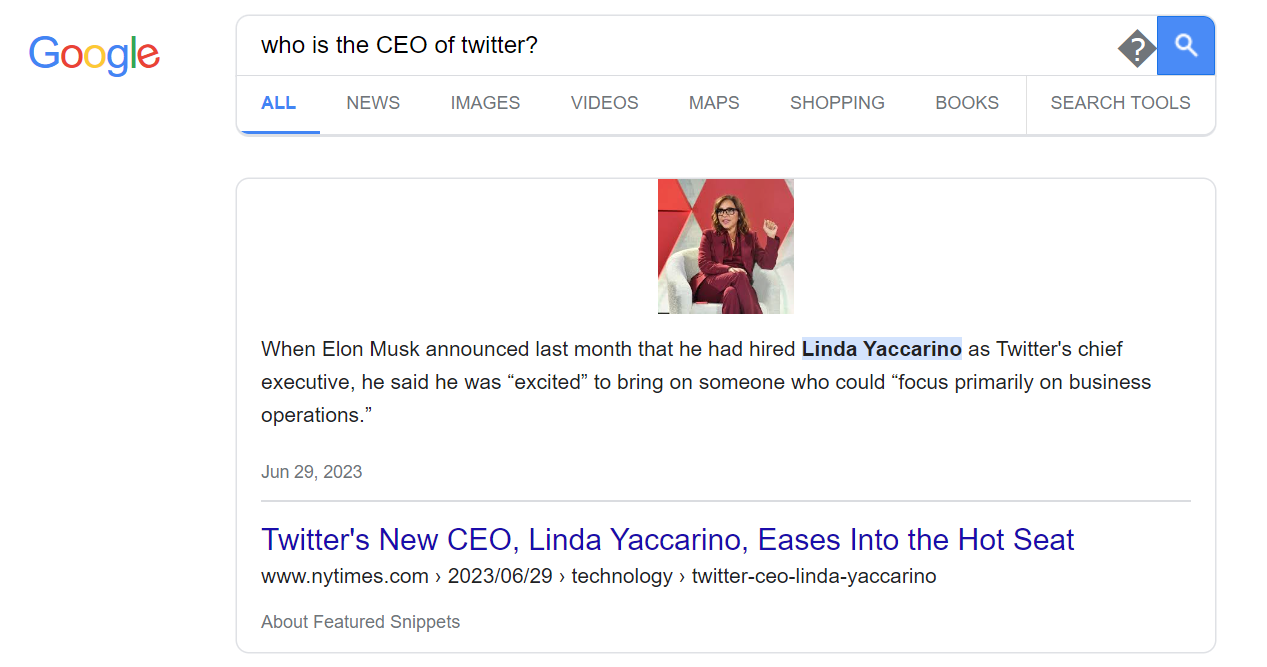
Figure 4‑3 The good old days of searching the internet for information
Let’s implement a simple search engine that will be able to answer questions about an evolving topic. In the following example, we will parse the Google result page. It provides typically 10 results, sometimes prefaced by a “featured snippet”1 followed by other questions that “people also ask”, and at the end of the list of results, a few “related searches”. We will then check the number of tokens on the page to make sure that it isn’t too long to “stuff” it with the initial question into a prompt for ChatGPT.
from bs4 import BeautifulSoup
import requests

def search(prompt):
    url = f'https://www.google.com/search?q={prompt}'
    html = requests.get(url).text
    with open('search.html','w') as f:
        f.write(html)
    # Get the text of the webpage
    soup = BeautifulSoup(html, "html.parser")
    text = soup.get_text()
    return text
text = search(prompt)
len(text)
8162
import tiktoken
def num_tokens(string: str) -> int:
    """Returns the number of tokens in a text string."""
    encoding_name = 'cl100k_base'
    encoding = tiktoken.get_encoding(encoding_name)
    num_tokens = len(encoding.encode(string))
    return num_tokens
num_tokens(text)
2116
The google result page is typically dense enough that we can simply stuff it into a model and get a good answer. Sometimes, you might want to retrieve the top 3 or 5 pages from the search to get a more comprehensive answer.
question = f"""Given the following context of Google search, answer the question:
{prompt}
---
Here is the context retrieve from Google search:
{text}
"""
ask(question)
'The CEO of Twitter is Linda Yaccarino.'
The heavy lifting in this example is performed by the search engine Google, and its excellent algorithm PageRank2, that ranks web pages in search results by evaluating the number and quality of links to a page. ChatGPT is relegated to the second role by “simply” ingesting the raw unprocessed text of the result page to make sense of the information and present it in a human friendly way.
Traditional search can also be called keyword search, in that it is leveraging inverted indexes, a data structure that allows a very quick lookup of documents containing certain words. This enables fast and accurate retrieval of documents based on keyword matches. The distributed nature of this architecture allows search engines to scale seamlessly, making it possible for platforms like Google to index the vast expanse of the early internet in the late 1990s.
Fetching documents is just one part of delivering a performant search experience; ranking is equally crucial. The introduction of TF-IDF3 (term-frequency, inverse-document-frequency) marked a significant breakthrough in ranking methodologies. TF-IDF assigns a score to each document based on the frequency of query terms within it (TF) and across the entire corpus (IDF). This scoring mechanism ensures that documents matching the query well and containing rare, specific terms are ranked higher, enhancing relevance.
While traditional search engines have laid the groundwork for modern information retrieval systems, they come with several limitations4 that impact their effectiveness and user experience.
- Text Processing Challenges
Search engines rely on keyword-based indexing, which poses challenges in text processing. Issues such as hyphenation, language differences, and case sensitivity can lead to inconsistencies in indexing and retrieval, affecting the search quality.
- Exact Matches and Stemming
Exact matching poses challenges, as queries for “cats” might not retrieve documents containing “cat.” Stemming, the process of reducing words to their root form, is a common solution. However, it introduces edge cases and exceptions, such as “universal” and “university” being stemmed to the same token.
- Word Ambiguity and Synonyms
Ambiguous words like “jaguar” present challenges in understanding user intent, as the context is often required to disambiguate meanings. Additionally, synonyms and related terms need to be mapped to ensure comprehensive retrieval, adding complexity to the system.
- Misspelling and Autocorrection
Spelling accuracy is crucial in keyword-based search engines. Misspelled queries can lead to irrelevant or no results. Implementing an effective autocorrect feature requires specific development tailored to the platform’s domain and user base.
- Language Support
Supporting multiple languages introduces additional complexity, requiring the resolution of each aforementioned challenge for each supported language. This multiplies the development effort and can result in varying search quality across languages.
All those limitations motivate the need for another class of search, called vector search.
Vector search
Now, let’s look into the concept of vector search, a technique for information retrieval that leverages a numeric representation of text (as vectors) to find semantically similar documents or passages.
First, we need to understand how language models convert prompts into chunks of text, that can be mapped to numbers. This is referred to as tokens.
Figure 4-4 gives you a sense of how words are broken into tokens, with a simple example of the GPT-4 tokenizer5 at play.
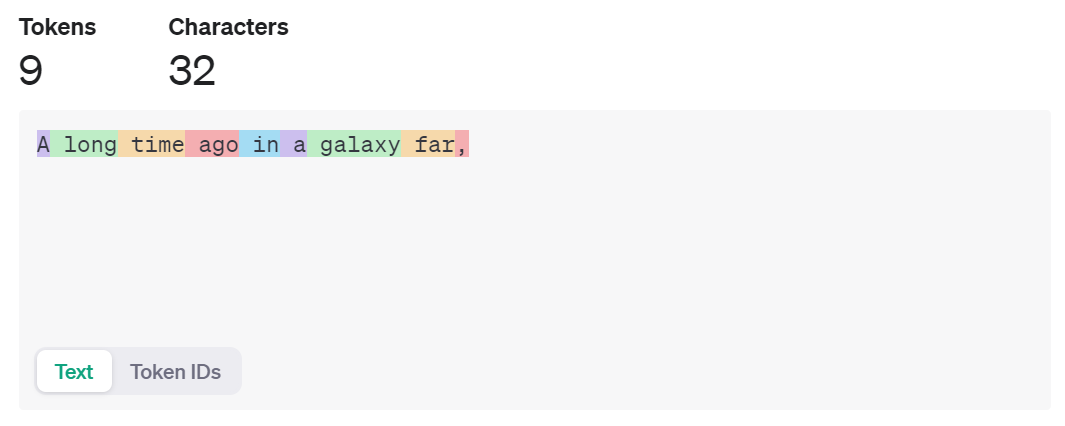
Figure 4‑4 Tokenization performed by GPT-4 under the hood
To replicate those results locally, you can install the python package tiktoken6 and change the input text to see how it is tokenized:
import tiktoken
text = 'A long time ago in a galaxy far,'
encoding = tiktoken.encoding_for_model('gpt-4')
tokens = encoding.encode(text)
print(tokens) # [32, 1317, 892, 4227, 304, 264, 34261, 3117, 11]
But this step isn’t sufficient to capture the meaning of words when they are simply mapped to a number. You need to turn those numbers into vectors that make sense.
Vector embeddings7 capture the semantic meaning of text by mapping words, sentences, or documents into high-dimensional vector spaces. Similar items in this space are close to each other, while dissimilar items are far apart. This property makes vector embeddings ideal for tasks like search and recommendation.
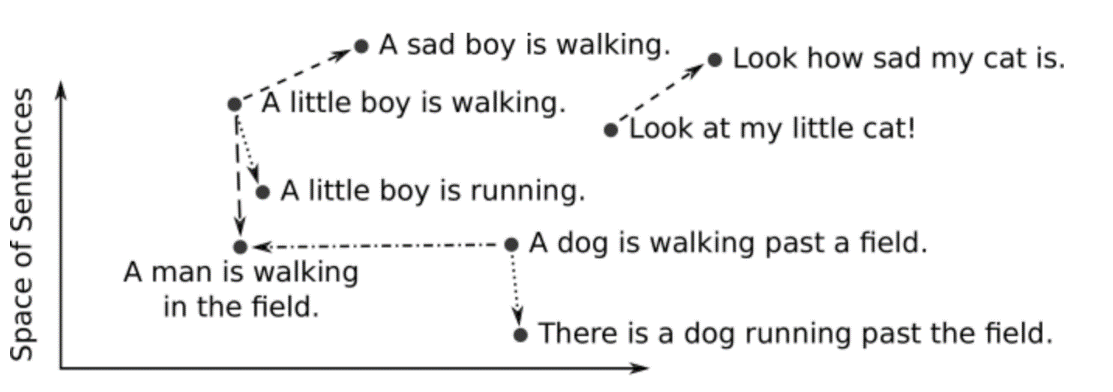
Figure 4‑5 Embedding representation in a simplified 2-D space of a few sentences
This conversion from text to vector can be processed in several ways. A simple approach is to look at each letter as a number. Another approach is words-level embeddings, like Word2Vec8, developed by Google. It uses shallow neural networks to produce word embeddings.
Let’s look at an example with the OpenAI’s text embeddings9, on the first paragraph of chapter 1 of A Tale of Two Cities by Charles Dickens10
paragraph = """
It was the best of times, it was the worst of times, it was the age of wisdom, it was the age of foolishness, it was the epoch of belief, it was the epoch of incredulity, it was the season of Light, it was the season of Darkness, it was the spring of hope, it was the winter of despair, we had everything before us, we had nothing before us, we were all going direct to Heaven, we were all going direct the other way—in short, the period was so far like the present period, that some of its noisiest authorities insisted on its being received, for good or for evil, in the superlative degree of comparison only.
"""
sentences = paragraph.replace("\n"," ").split(", ")
from openai import OpenAI
client = OpenAI()
sentence = sentences[0]
response = client.embeddings.create(
    input=sentence,
    model="text-embedding-3-small"
)
embedding = response.data[0].embedding
print(len(embedding))
embedding[:3]
1536
[-0.0071602072566747665, -0.013691387139260769, 0.02635223977267742]
We can batch things up by sending the whole list of sentences to the OpenAI embeddings service, and use numpy as a way to store and index the vectors:
import numpy as np
response = client.embeddings.create(
    input=sentences,
    model="text-embedding-3-small"
)
v = [d.embedding for d in response.data]
v = np.array(v)
v.shape
(18, 1536)
Different factors that come into consideration when choosing an embedding model:
-
Size of the dictionary
-
Performance of the calculation
-
Price of the service (if hosted)
Using larger embeddings, for example storing them in a vector store for retrieval, generally costs more and consumes more compute, memory and storage than using smaller embeddings. By default, the length of the embedding vector will be 1536 for text-embedding-3-small or 3072 for text-embedding-3-large.
The Massive Text Embedding Benchmark (MTEB)11 from Hugging Face helps in assessing the performance of different embedding models, representing here models by average English MTEB score (y) vs speed (x) vs embedding size (circle size):
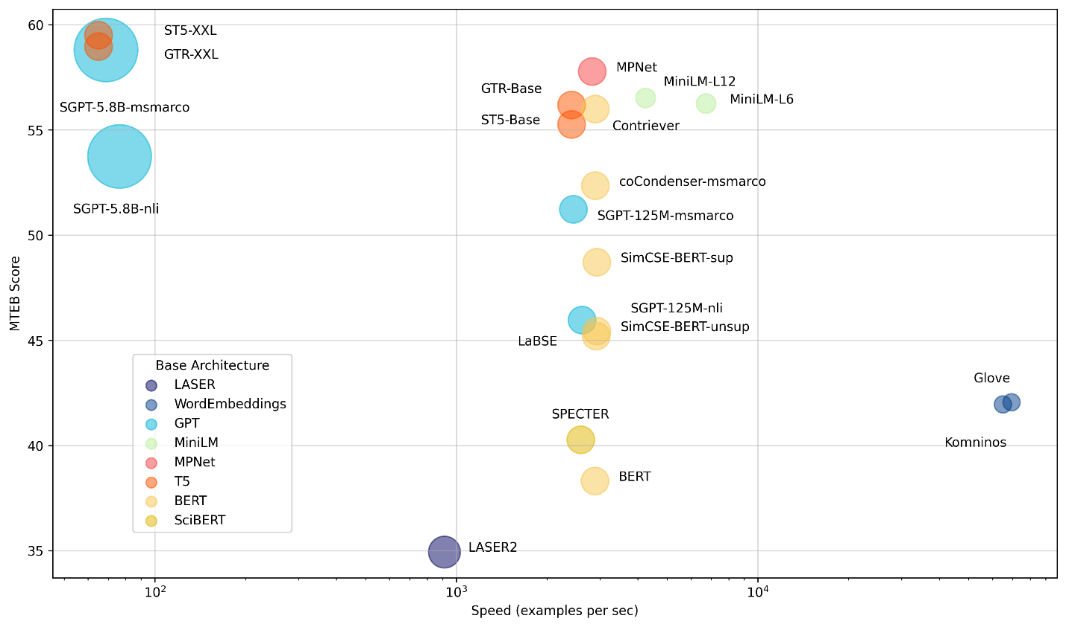
Figure 4‑6 Massive Text Embedding Benchmark
Sentence transformers12 is a python framework that provides access to state-of-the-art embeddings models, like the one referred to in the benchmark above.
from sentence_transformers import SentenceTransformer
model = SentenceTransformer('all-MiniLM-L6-v2') # or 'all-mpnet-base-v2'

embedding = model.encode(sentence)
embedding.shape
(384,)
There are different ways to measure semantic similarity13, by calculating the distance in a high dimensional vector embedding space. One approach is to use trigonometry, with cosine similarity described with the following 3 cases in 2 dimensions:
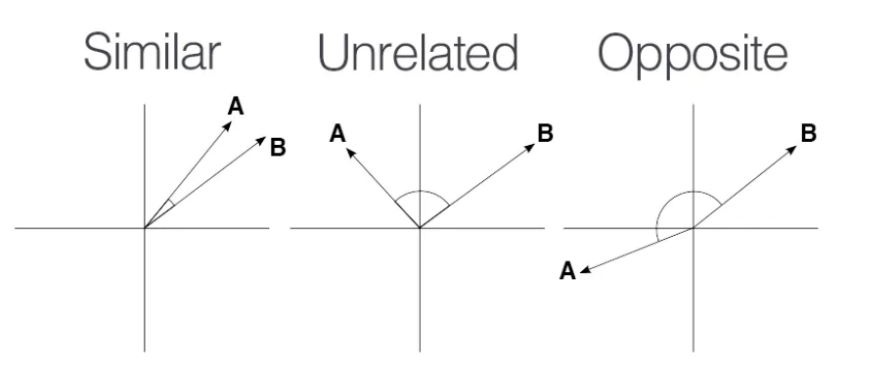

Figure 4‑7 Similarity search explained in a 2-D space
We can simply use provides the numpy.dot14 function to calculate the dot product between two vectors.
def cosine_similarity(vec1, vec2):
    dot_product = np.dot(vec1, vec2)
    norm_vec1 = np.linalg.norm(vec1)
    norm_vec2 = np.linalg.norm(vec2)
    return dot_product / (norm_vec1 * norm_vec2)
sentences[0], sentences[1], cosine_similarity(v[0], v[1])
(' It was the best of times', 'it was the worst of times', 0.6745445520884016)
sentences[2], sentences[3], cosine_similarity(v[2], v[3])
('it was the age of wisdom',
'it was the age of foolishness',
0.8072276532681985)
The previous illustrations of vector search by computing on the fly the distance with every vector of the database isn’t scalable. That is why you need to index your database15.
LlamaIndex: building an index
One of the early frameworks that competed with LangChain nicely to enable question answering was LlamaIndex16 (initially known as GPTindex). It stood out by the simplicity of its implementation.
The concept is quite straightforward:
-
You store your documents in tidy location
-
You build an index on your data
-
You define a query engine/retriever based on this index
-
You ask questions against this query engine (in the first versions, you would ask questions directly against the index)
Let’s illustrate this by a simple demo based on their starter tutorial17:
- Step 1: Load documents (PDF reader)
With a little bit of practice, you will realize that the performance and robustness of your LLM application relies a lot on the preprocessing pipeline that feeds chunks of text for retrieval-augmented generation.
As such, it is interesting to spend some time on the inputs of your knowledge retrieval engine. Document loaders are an important part of the equation, as they structure the information that is ingested.
In this chapter, we will use the book Impromptu as context to answer questions with ChatGPT. Let’s start by extracting the content of this pdf with pypdf18:
import requests, io, pypdf

url = 'https://www.impromptubook.com/wp-content/uploads/2023/03/impromptu-rh.pdf'
def pdf_to_pages(file):
    "extract text (pages) from pdf file"
    pages = []
    pdf = pypdf.PdfReader(file)
    for p in range(len(pdf.pages)):
        page = pdf.pages[p]
        text = page.extract_text()
        pages += [text]
    return pages
r = requests.get(url)
f = io.BytesIO(r.content)
pages = pdf_to_pages(f)
print(pages[1])
Impromptu
Amplifying Our Humanity
Through AI
By Reid Hoffman
with GPT-4
if not os.path.exists("impromptu"):
    os.mkdir("impromptu")
for i, page in enumerate(pages):
    with open(f"impromptu/{i}.txt","w", encoding='utf-8') as f:
        f.write(page)
sep = '\n'
book = sep.join(pages)
print(book[0:35])
Impromptu
Amplifying Our Humanity
num_tokens(book)
83310
- Step 2: Build an index
from llama_index import SimpleDirectoryReader, VectorStoreIndex
documents = SimpleDirectoryReader("impromptu").load_data()
index = VectorStoreIndex.from_documents(documents)

index.storage_context.persist()
- Step 3: Query the index
query_engine = index.as_query_engine()
response = query_engine.query('what is the potential of AI for Education?')
print(response)
AI has the potential to become a powerful tool in education, transforming the way we learn and deliver instruction. It can provide personalized and individualized learning experiences tailored to each student's needs and interests. AI can also assist teachers in identifying the topics and skills that students need to focus on, providing guidance and support as needed. Additionally, AI-driven tools can automate and streamline certain aspects of teaching, such as grading and content creation, freeing up teachers' time to focus on engaging and inspiring their students. However, the full potential of AI in education may be limited by factors such as cost, access, and privacy concerns.
sources = [s.node.get_text() for s in response.source_nodes]
print(sources[0][0:11])
47Education
The beauty of this approach is that is simply stores the embeddings into json files. You can take a look at the storage folder created that maps documents hash to an embedding.
But this simple text file approach doesn’t scale so well when it comes to storing large document bases. For this, let’s look into vector databases.
Vector databases
A vector database is a data store that stores data as high-dimensional vectors, which are mathematical representations of attributes or features. Some examples of vector databases include: Chroma, Pinecone, Weaviate, Faiss, Qdrant, MongoDB
Let’s start with Chroma, that arguably provides the lowest learning curve to set up and use a vector database with semantic search19. Pip install it, discover the basic commands and call it from LangChain.
import chromadb

client = chromadb.PersistentClient()
collection = client.create_collection("sample_collection")

collection.add(
    documents=["This is document1", "This is document2"], # we embed for you, or bring your own
    metadatas=[{"source": "notion"}, {"source": "google-docs"}], # filter on arbitrary metadata!
    ids=["doc1", "doc2"], # must be unique for each doc
)
results = collection.query(
    query_texts=["This is a query document"],
    n_results=2,
    # where={"metadata_field": "is_equal_to_this"}, # optional filter
    # where_document={"$contains":"search_string"}  # optional filter
)
results
{'ids': [['doc1', 'doc2']],
'distances': [[0.9026352763807001, 1.0358158255050436]],
'metadatas': [[{'source': 'notion'}, {'source': 'google-docs'}]],
'embeddings': None,
'documents': [['This is document1', 'This is document2']],
'uris': None,
'data': None}
Now let’s integrate it in LangChain. For this example, we will only index the chapter 1 of Impromptu on Education (not using the full book to avoid unnecessary cost to create embeddings).
import requests, io, pypdf
from langchain.chains import RetrievalQA
from langchain_community.document_loaders import PyPDFLoader
from langchain.vectorstores import Chroma
from langchain_openai import ChatOpenAI, OpenAIEmbeddings
chat = ChatOpenAI(model_name='gpt-4o-mini')
url = 'https://www.impromptubook.com/wp-content/uploads/2023/03/impromptu-rh.pdf'

r = requests.get(url)
f = io.BytesIO(r.content)
pdf = pypdf.PdfReader(f)
writer = pypdf.PdfWriter()
for p in range(31,54):
    writer.add_page(pdf.pages[p])
with open("impromptu_32-54.pdf","wb") as f:
    writer.write(f)

loader = PyPDFLoader("impromptu_32-54.pdf")
pages = loader.load_and_split()

embeddings = OpenAIEmbeddings()

db = Chroma.from_documents(pages, embeddings)

retriever = db.as_retriever(search_type="similarity", search_kwargs={"k":3})

qa = RetrievalQA.from_chain_type(
    llm=chat, chain_type="stuff", retriever=retriever, return_source_documents=True)
query = 'what are the opportunities of using AI?'
result = qa.invoke({"query": query})
result
{'query': 'what are the opportunities of using AI?',
'result': 'The opportunities of using AI in education include automating and streamlining mundane tasks like grading and content creation, providing personalized and individualized learning experiences, giving teachers more time to focus on engaging students, and potentially transforming the way we learn and deliver instruction. AI can also help identify topics and skills students need to focus on and provide guidance and support accordingly.',
'source_documents': [Document(page_content='...', metadata={'page': 22, 'source': 'impromptu_32-54.pdf'}),
Document(page_content='...', metadata={'page': 21, 'source': 'impromptu_32-54.pdf'}),
Document(page_content='...' , metadata={'page': 3, 'source': 'impromptu_32-54.pdf'})]}
Let’s try Facebook AI Similarity Search (faiss)20, which is known to be insanely performant:
from langchain_community.vectorstores import FAISS
from langchain_openai import OpenAIEmbeddings
faiss_index = FAISS.from_documents(pages, OpenAIEmbeddings())
docs = faiss_index.similarity_search("what are the opportunities of using AI?", k=3)
for doc in docs:
    print(str(doc.metadata["page"]) + ":", doc.page_content[:48])
22: 47Education
the technology will also create an e
21: 46Impromptu: Amplifying Our Humanity Through AI
3: 28Impromptu: Amplifying Our Humanity Through AI
Finally, after standing up a vector database, you can build a RAG production system:
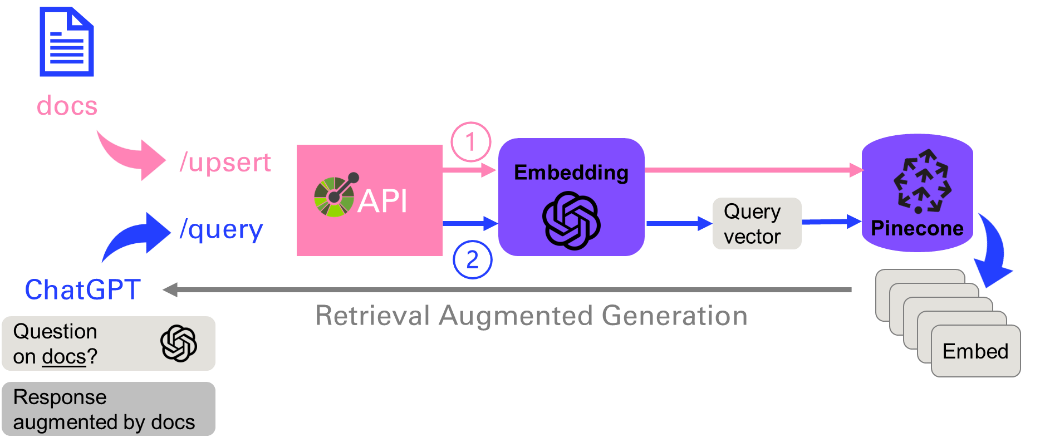
Figure 4‑8 Architecture of a production system leveraging RAG
As you will see in the last chapter, this application21 can be nicely architectured with plugins, that clearly define the API with two main endpoints: upsert (to update or insert the vector database), or query that will convert the prompt into an embedding and perform a vector search to find the N (= 5) closest ones.
4.3. Application: Question answering on Book
This is what the app will look like, a simple text entry and a button to trigger the workflow. The answer will be written in the body, with sources from the document corpus. Check out the code under chap4/qa_app.py
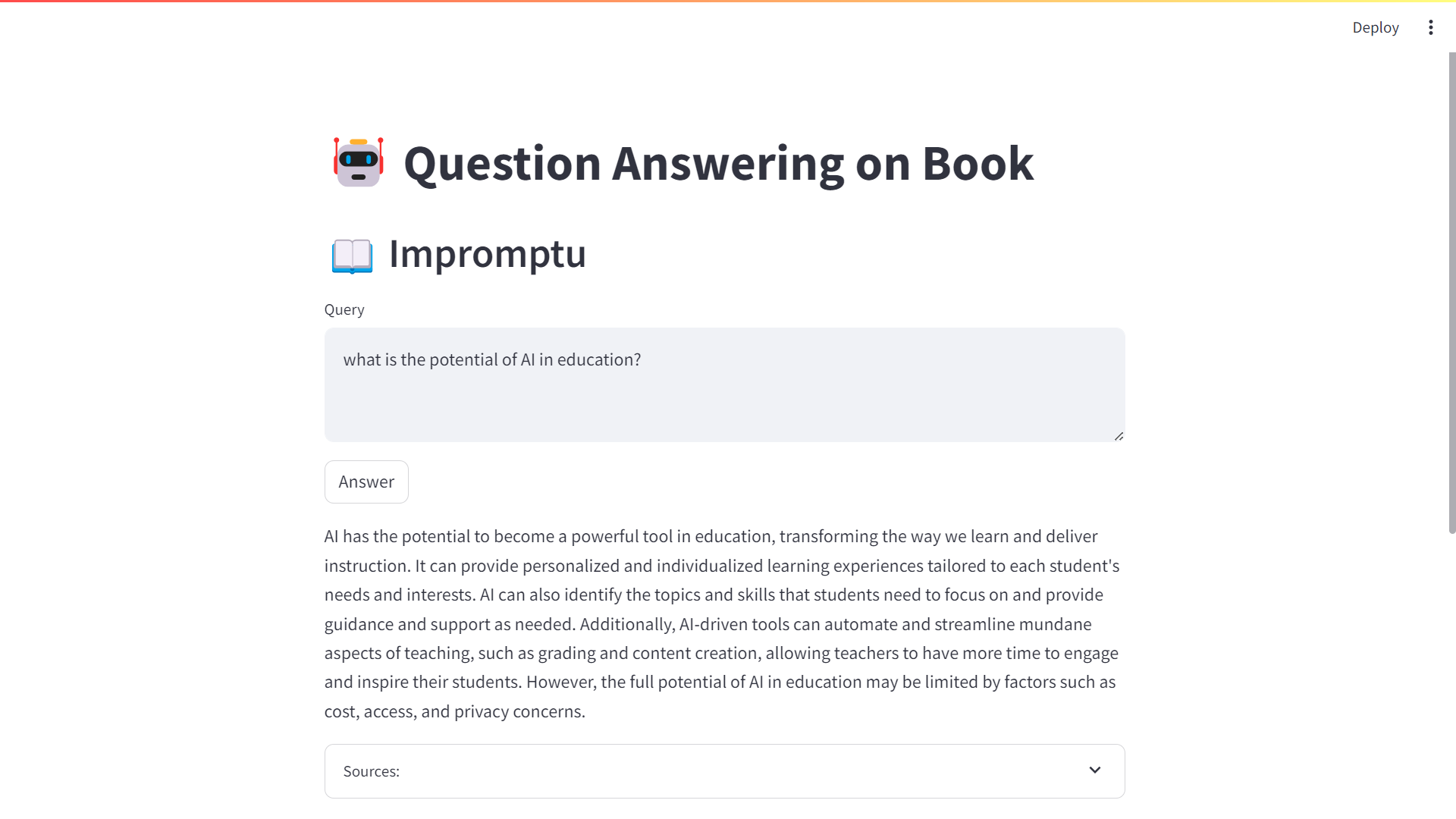
Figure 4‑9 Application of question answering on the book Impromptu
As usual I first implement a version of this workflow in a notebook, so that I can iterate and debug interactively. Then I refactor the code as an app, by adding some UI components. You could imagine additional features, like the ability to upload your own documents.
| ⬅️ Prompting, Chaining and Summarization | 🏠 Home | Agents & Tools ➡️ |
-
How Google’s featured snippets work: https://support.google.com/websearch/answer/93517071 ↩
-
Google Still Uses PageRank. Here’s What It Is & How They Use It https://ahrefs.com/blog/google-pagerank/ ↩
-
Understanding TF-ID: A Simple Introduction https://monkeylearn.com/blog/what-is-tf-idf/ ↩
-
Vector vs Keyword Search https://www.algolia.com/blog/ai/vector-vs-keyword-search-why-you-should-care/ ↩
-
OpenAI tokenizer page: https://platform.openai.com/tokenizer ↩
-
Tiktoken package: https://github.com/openai/tiktoken ↩
-
Vector Embeddings: https://www.pinecone.io/learn/series/nlp/dense-vector-embeddings-nlp/ ↩
-
Word2Vec: https://www.tensorflow.org/text/tutorials/word2vec ↩
-
OpenAI’s text embeddings: https://platform.openai.com/docs/guides/embeddings ↩
-
A Tale of Two Cities by Charles Dickens: https://www.gutenberg.org/ebooks/98 ↩
-
Massive Text Embedding Benchmark: https://huggingface.co/blog/mteb ↩
-
Sentence Transformers: https://sbert.net/ ↩
-
Sentence Similarity With Sentence-Transformers in Python: https://www.youtube.com/watch?v=Ey81KfQ3PQU ↩
-
Numpy dot function: https://numpy.org/doc/stable/reference/generated/numpy.dot.html ↩
-
Vector Databases simply explained! (Embeddings & Indexes) https://www.youtube.com/watch?v=dN0lsF2cvm4 ↩
-
Llama-index: https://docs.llamaindex.ai/en/stable/ ↩
-
Llama-index starter tutorial: https://docs.llamaindex.ai/en/stable/getting_started/starter_example.html ↩
-
Getting Started with ChromaDB - Lowest Learning Curve Vector Database & Semantic Search https://www.youtube.com/watch?v=QSW2L8dkaZk ↩
-
ChatGPT Plugins: https://www.youtube.com/watch?v=hpePPqKxNq8 ↩