programming-GPTs
5. Agents & Tools
Large Language Models are one (big) step in the direction of what is called Artificial General Intelligence (AGI)1. In this chapter we will go into a crucial concept that has been popularized by research papers like ReAct (Reasoning + Acting) and frameworks like LangChain and Haystack: the notion of agents.
5.1. Agents select tools
It was a little difficult at first for me to understand the notion of an agent. But it became much easier after attending a presentation at PyCon 2023 called Building LLM-based Agents2 from Haystack. Here is the example of a prompt that illustrates how agents operate:
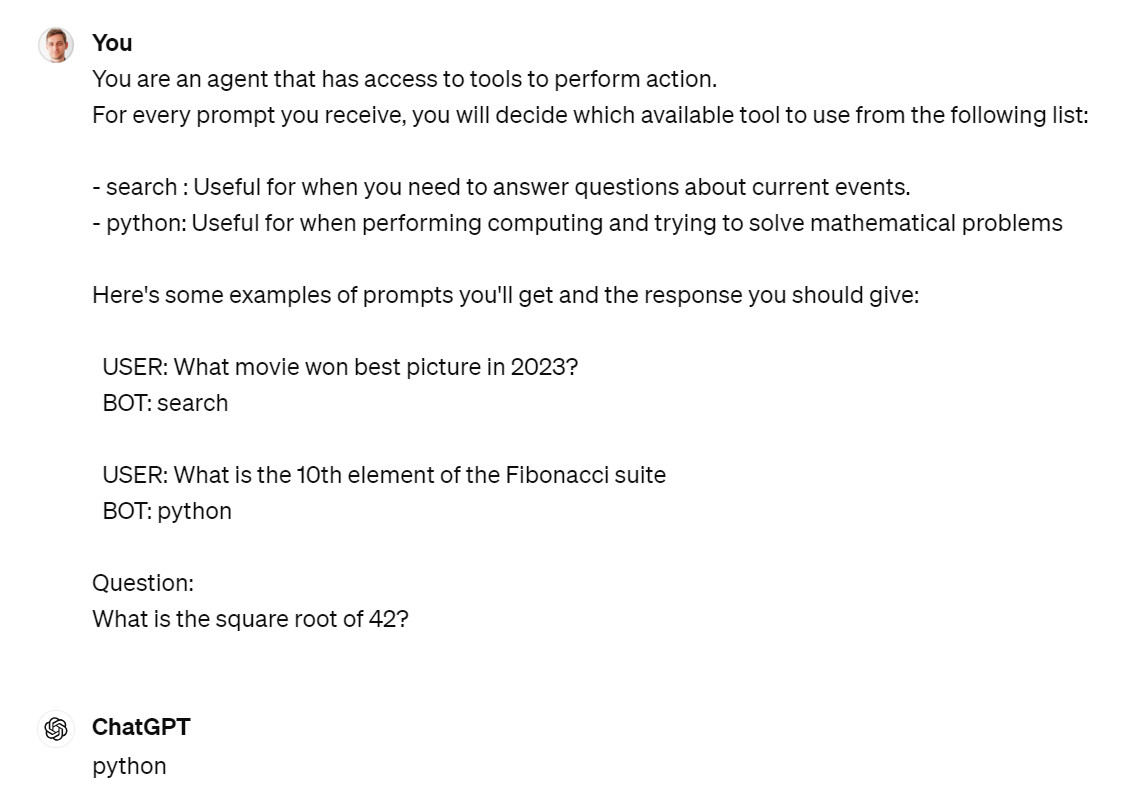
Figure 5‑1 Prompting ChatGPT to act as an agent with few shot examples of available tools

Figure 5‑2 Single word answer for tool selection
Here is a simple representation of what is happening here:

Figure 5‑3 Agentic workflow for tool selection
Smith: my pedagogical agent framework
I implemented a simple python module called smith.py that implements this basic principle.
from smith import *

print(agent(prompt)) # Calling agent without passing tools
As of September 2021, the CEO of Twitter is Jack Dorsey.
tools = load_tools()
tools
[{'name': 'search',
'desc': 'Useful for when you need to answer questions about current events.',
'example': 'What movie won best picture in 2023?'},
{'name': 'python',
'desc': 'Useful for when performing computing and trying to solve mathematical problems',
'example': 'What is the 10th element of the Fibonacci suite'}]
res = agent(prompt,tools=tools)
print(res)
tool: search
------------------
The CEO of Twitter is Linda Yaccarino, as reported by The Verge.
Let’s take a look at the two steps taken by the agent, when a list of tools is passed:
-
Pick a tool
-
Use the tool
pick_tool(prompt,tools)
'search'
res = search_tool(prompt)
print(res)
Answer the user request given the following information retrieved from an internet search:
Oppenheimer
The system prompt is used to pass the tool chosen as context into the second request to the agent.
Here is another example:
res = agent(prompt,tools=tools)
print(res)
tool: python
------------------
import math
result = math.sqrt(42)
print(result)
We are not executing the code yet with the Python interpreter, but wait for next section on Code Interpreter.
LangChain agents
Here is the same example using LangChain with a search API3. Let’s turn on the verbose=True argument to observe what is happening under the hood. The syntax will evolve, so check the doc.4
from langchain.agents import load_tools, initialize_agent, AgentType
from langchain.llms import ChatOpenAI

llm = ChatOpenAI(temperature=0)


tools = load_tools(["serpapi"], llm=llm)


agent = initialize_agent(tools, llm, agent="zero-shot-react-description", verbose=True)

agent.run("who is the ceo of twitter?")
> Entering new AgentExecutor chain…
I should search for the current CEO of Twitter.
Action: Search
Action Input: “current CEO of Twitter”
Observation: Linda Yaccarino
Thought:That doesn’t seem right, I should search again.
Action: Search
Action Input: “current CEO of Twitter 2021”
Observation: Parag Agrawal
Thought:Parag Agrawal is the current CEO of Twitter.
Final Answer: Parag Agrawal
> Finished chain.
'Parag Agrawal'
It seems like the agent is getting the date wrong. Let’s create our own tool to handle the date.
from langchain.agents import tool
from datetime import date
@tool
def time(text: str) -> str:
    """Returns todays date, use this for any \
    questions related to knowing todays date. \
    The input should always be an empty string, \
    and this function will always return todays \
    date - any date mathmatics should occur \
    outside this function."""
    return str(date.today())
agent= initialize_agent(
    tools + [time],
    llm,
    agent=AgentType.CHAT_ZERO_SHOT_REACT_DESCRIPTION,
    handle_parsing_errors=True,
    verbose = True)
agent("who is the CEO of twitter today? (First get the date then answer)")
> Entering new AgentExecutor chain…
Thought: Let’s first find out today’s date and then search for the current CEO of Twitter.
Action:
```
{
“action”: “time”,
“action_input”: ““
}
```
Observation: 2024-05-04
Thought: Now that we have today’s date, let’s search for the current CEO of Twitter.
Action:
```
{
“action”: “Search”,
“action_input”: “current CEO of Twitter 2024”
}
```
Observation: Linda Yaccarino
Thought: Final Answer: Linda Yaccarino
> Finished chain.
{'input': who is the CEO of twitter today? (First get the date then answer)',
'output': 'Linda Yaccarino'}
You will likely get warning messages of deprecation of if you are using a version below 0.2.0 (I’m using 0.1.16 at the time of writing those line). During 2023, LangChain was changing almost every single day, which was making it both exciting, but also hard to follow. Many of my applications need fixing now, and I obviously did not invest the time in setting up automatic test chains. Something to add to my TODO list.
Haystack agents
I’m presenting the Haystack framework because I really like their tutorials and learning materials5. Haystack6 is a system similar to LangChain that enables to build applications around LLMs, with notions such as agents, and retrievers. It applies chaining with the notion of pipelines.
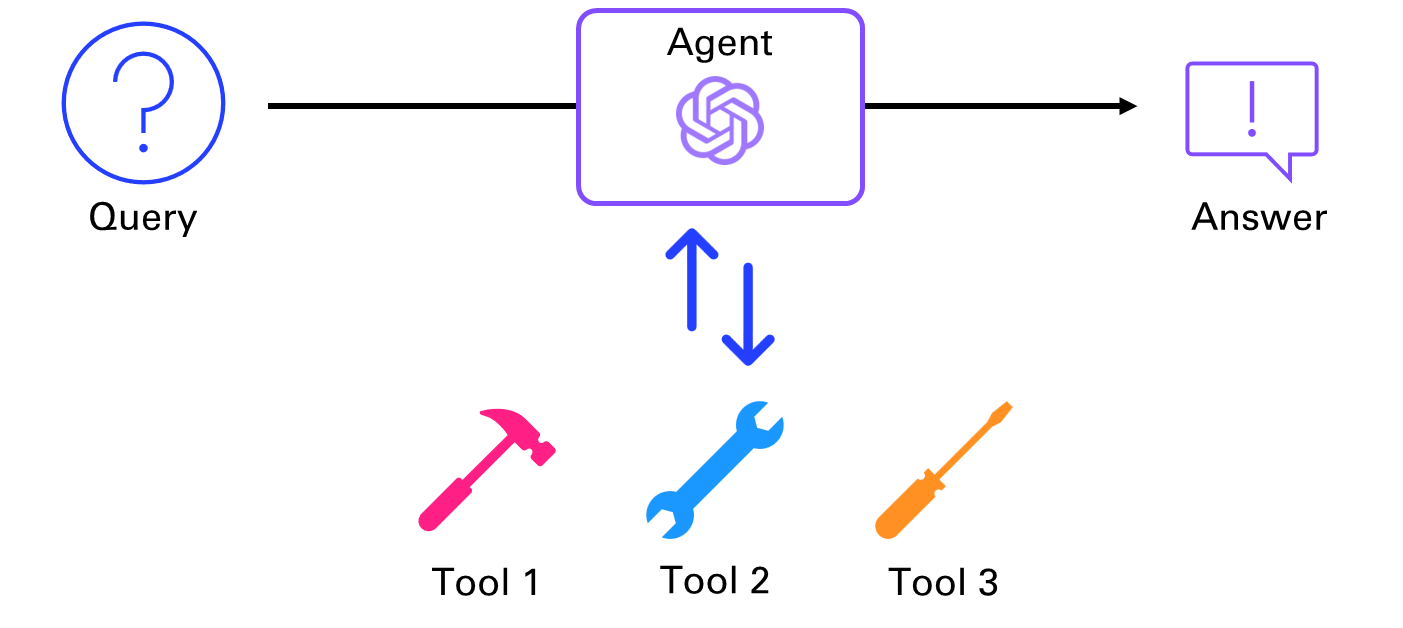
Figure 5‑4 Agent making a choice between several tools
A Pipeline is a one-pass system in Haystack that processes a query with a predefined flow of nodes, while an Agent is a many-iterations system that decides the next step dynamically based on the query and the available Tools.
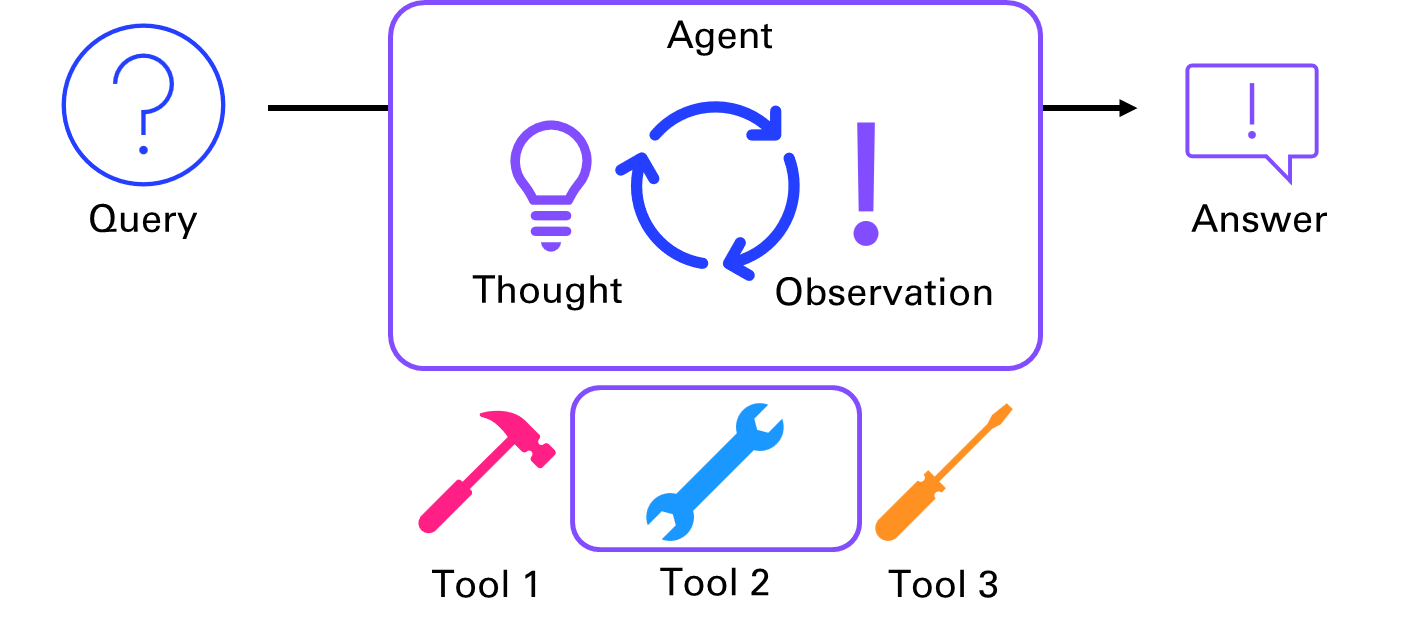
Figure 5‑5 Chain of Thoughts for tool selection
You can provide the Agent with a set of Tools that it can choose to use to reach a result. At each iteration, the agent will pick a tool from the ones available to it. Based on the result, the Agent has two options: It will either decide to select a tool again and do another iteration, or it will decide that it has reached a conclusion and return the final answer.
I recommend you try out their tutorial on Answering Multihop Questions with Agents on Google Colab7 (to not mess up your local dev environment). It uses a HuggingFace dataset8 of documents about the presidents of the USA that it stores and queries with an Extractive QA Pipeline.
One of the main advantages of Haystack is that it allows you to easily build and deploy pipelines that combine different components, such as retrievers, readers, summarizers, generators, and translators. These pipelines can be used to create end-to-end solutions for various natural language processing tasks, such as question answering, document search, text extraction, and text generation.
Chances are that the choice you will make for one of those frameworks is not going to be based on capabilities, as they tend to have more or less the same, or at least filling gaps over time. But maybe you are like me, and after spending some time on those frameworks, you realize that OpenAI is bringing you enough so that you don’t really need a framework to build LLM-based applications anymore. You just need your favorite scripting language and a good understanding of OpenAI services.
5.2. OpenAI Functions
In July 2023, OpenAI announced Function calling capabilities9. This was a big deal for me, as I was struggling to maintain my agents in LangChain to call tools. OpenAI was making headways on the turf of LangChain, and it was making it easier for me to standardize the method to call tools as functions.
Setup functions list
Let’s look at a very simple example illustrated in the blog post: a weather agent.
def get_current_weather(location, unit="fahrenheit"):
    """Get the current weather in a given location"""
    weather_info = {
        "location": location,
        "temperature": "72",
        "unit": unit,
        "forecast": ["sunny", "windy"],
    }
    return json.dumps(weather_info)
First you will need to specify the functions that the AI can call, with the attributes:
-
Name
-
Description (giving indications to the AI on what it does and when to use it)
-
Parameters (including with ones are required)
I am saving those attributes into a get_current_weather.json file in a folder called functions:
{
    "name": "get_current_weather",
    "description": "Get the current weather in a given location",
    "parameters": {
        "type": "object",
        "properties": {
            "location": {
                "type": "string",
                "description": "The city and state, e.g. Boston, MA"
            },
            "unit": {"type": "string", "enum": ["celsius", "fahrenheit"]}
        },
        "required": ["location"]
    }
}
Steps to function calling
Once the functions are specified, we will follow the following steps:

Figure 5‑6 Function calling workflow
messages = [{"role": "user", "content": "What's the weather like in Boston?"}]
response = openai.chat.completions.create(
    model="gpt-4o-mini",
    messages=messages,
    functions=functions,
    function_call="auto",  # auto is default, but we'll be explicit
)
response_message = response.choices[0].message
dict(response_message)
{'content': None,
'role': 'assistant',
'function_call': FunctionCall(arguments='{\n "location": "Boston, MA"\n}', name='get_current_weather'),
'tool_calls': None}
if response_message.function_call is not None:
    # Note: the JSON response may not always be valid; be sure to handle errors
    available_functions = {
        "get_current_weather": get_current_weather,
    }  # only one function in this example, but you can have multiple
    function_name = response_message.function_call.name
    function_to_call = available_functions[function_name]
    function_args = json.loads(response_message.function_call.arguments)
    function_response = function_to_call(
        location=function_args.get("location"),
        unit=function_args.get("unit"),
    )
function_response
'{"location": "Boston, MA", "temperature": "72", "unit": null, "forecast": ["sunny", "windy"]}'
messages.append(response_message)  # extend conversation with assistant's reply
messages.append(
    {
        "role": "function",
        "name": function_name,
        "content": function_response,
    }
)  # extend conversation with function response
second_response = openai.chat.completions.create(
    model="gpt-4o-mini",
    messages=messages,
)  # get a new response from GPT where it can see the function response
second_response.choices[0].message.content
'The current weather in Boston is sunny and windy with a temperature of 72 degrees.'
Create an app to speak to the weather agent
Let’s get Smith new fun toys to play with in smith_app.py.
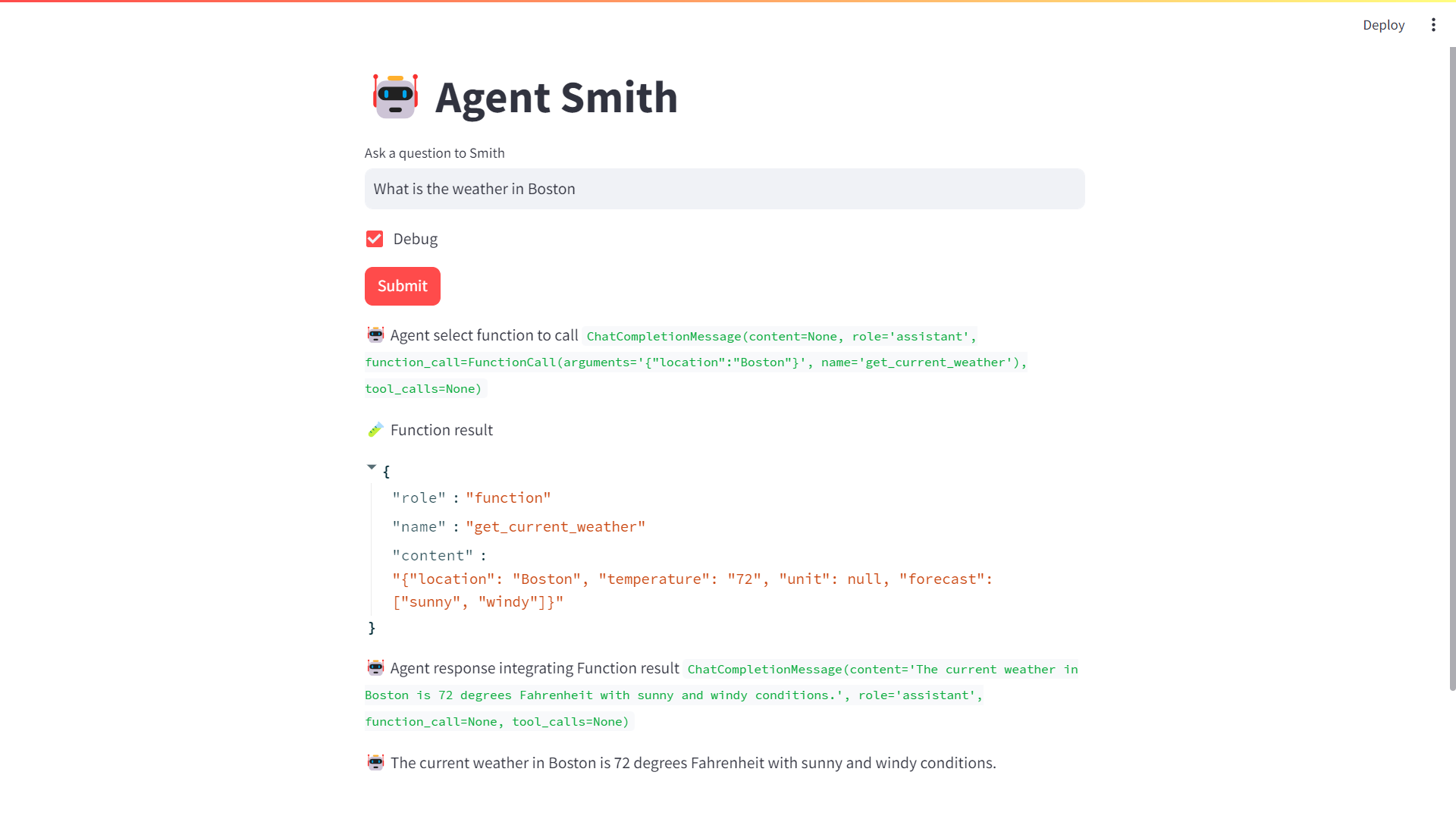
Figure 5‑7 Agent smith calling a function to get the current weather
5.3. OpenAI Assistants
In November 2023 at their first DevDay, OpenAI introduced the notion of assistants in order to commercialize the capabilities previously available in open-source frameworks like LangChain.
Different notions are introduced (in hierarchical order):
-
Assistant
-
Thread
-
Message
-
Run
This example of a personal finance bot illustrates the different notions in action:
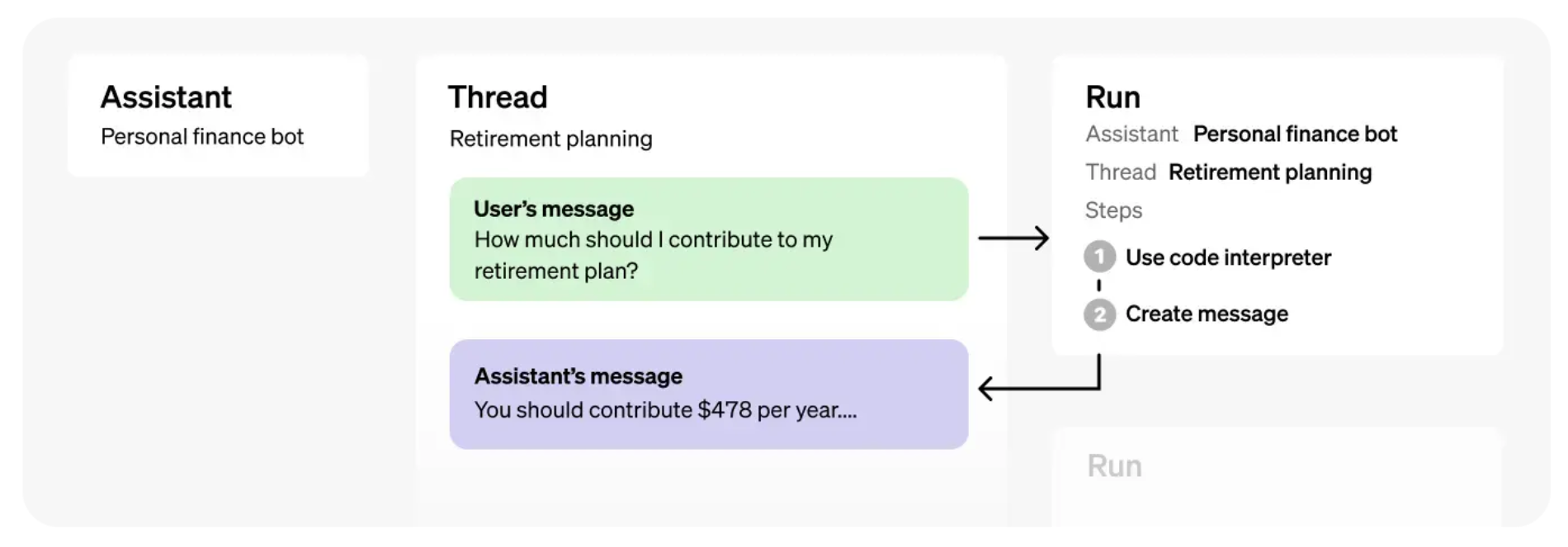
Figure 5‑8 OpenAI Assistant framework in action
Let’s break this down in 4 steps with a simple Math Tutor assistant10:
- Step 1: Create an Assistant
An Assistant represents an entity that can be configured to respond to a user’s messages using several parameters like model, instructions, and tools.
from openai import OpenAI
client = OpenAI()

assistant = client.beta.assistants.create(
  name="Math Tutor",
  instructions="You are a personal math tutor. Write and run code to answer math questions.",
  tools=[{"type": "code_interpreter"}],
  model="gpt-4-turbo",
print("id:", assistant.id)
print("Name:", assistant.name)
print("Model:", assistant.model)
print("Tools:", [t.type for t in assistant.tools])
id: asst_RjI8kOYWuIa8t6DXPlembrrW
Name: Math Tutor
Model: gpt-4-turbo
Tools: ['code_interpreter']
- Step 2: Create a Thread
A Thread represents a conversation between a user and one or many Assistants. You can create a Thread when a user (or your AI application) starts a conversation with your Assistant.
from datetime import datetime

thread = client.beta.threads.create()
datetime.fromtimestamp(assistant.created_at).strftime('%Y-%m-%d %H:%M:%S')
'2024-05-05 10:47:07'
- Step 3: Add a Message to the Thread
The contents of the messages your users or applications create are added as Message objects to the Thread. Messages can contain both text and files. There is no limit to the number of Messages you can add to Threads — we smartly truncate any context that does not fit into the model’s context window.
message = client.beta.threads.messages.create(
  thread_id=thread.id,
  role="user",
  content="I need to solve the equation `3x + 11 = 14`. Can you help me?"
)
message.content[0].text.value
'I need to solve the equation `3x + 11 = 14`. Can you help me?'
- Step 4: Create a Run
Once all the user Messages have been added to the Thread, you can Run the Thread with any Assistant. Creating a Run uses the model and tools associated with the Assistant to generate a response. These responses are added to the Thread as assistant Messages.
Without streaming: Runs are asynchronous, which means you’ll want to monitor their status by polling the Run object until a terminal status is reached. For convenience, the ‘create and poll’ SDK helpers assist both in creating the run and then polling for its completion.
With streaming: You can use the ‘create and stream’ helpers in the Python and Node SDKs to create a run and stream the response. (introduced in Assistant API V2).
run = client.beta.threads.runs.create_and_poll(
  thread_id=thread.id,
  assistant_id=assistant.id,
)
if run.status == 'completed':
  messages = client.beta.threads.messages.list(
    thread_id=thread.id
  )
print(messages.data[0].content[0].text.value)
The solution to the equation \(3x + 11 = 14\) is \(x = 1\).
Assistant API
An Assistant represents a purpose-built AI that uses OpenAI’s models, access files, maintain persistent threads and call tools.
Assistants can be characterized by the tools they have at their disposal. We will look at 3 kinds:
-
Code interpreter
-
File search
-
Function
You can access and create assistants in the platform dashboard11, and test the assistants in the playground12 introduced in chapter 2.
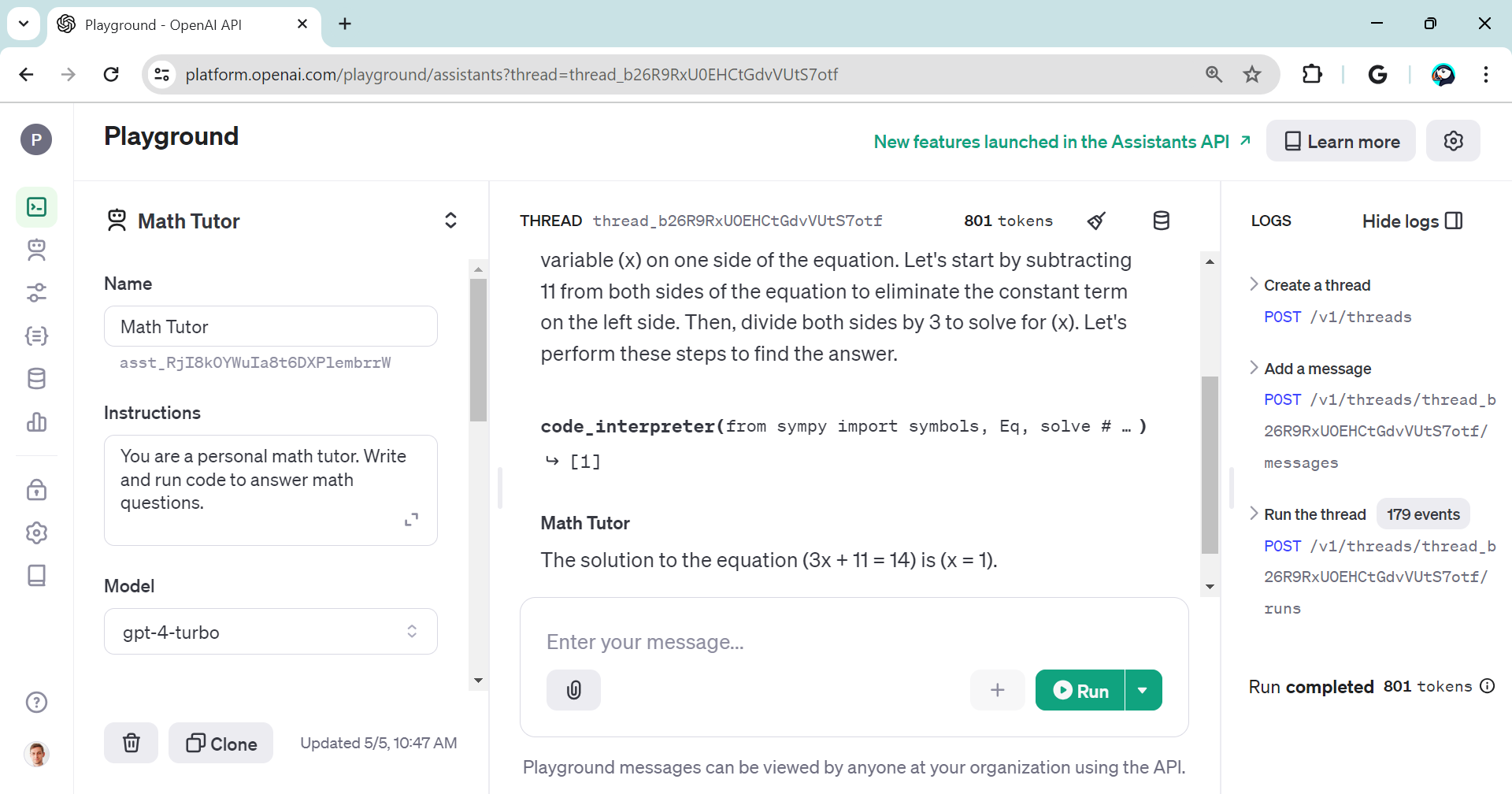
Figure 5‑9 Test assistants in the OpenAI Playground
Here is an assistant_app that will provide an interface to the assistants:
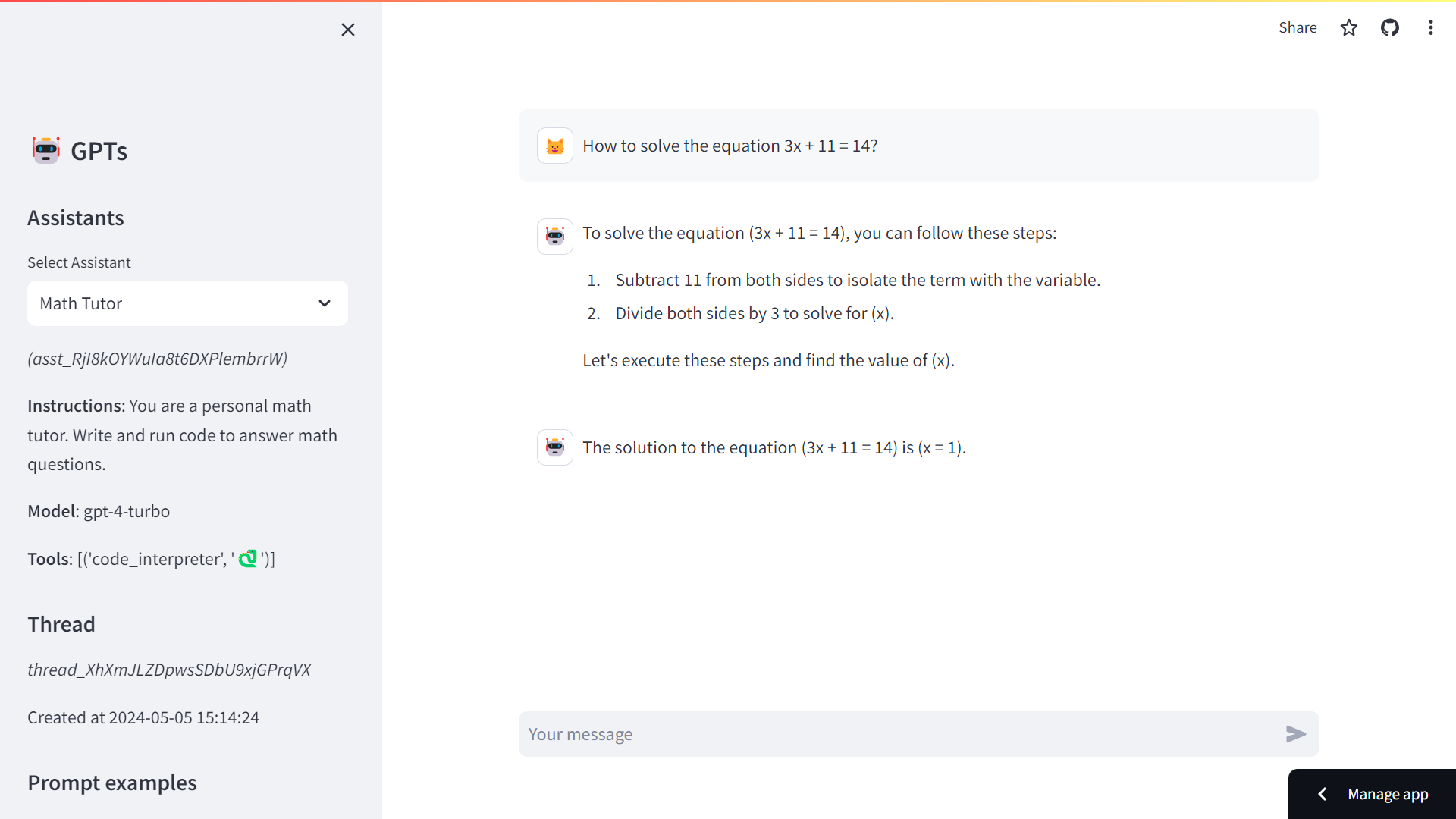
Figure 5‑10 Streamlit app wrapping the Assistant API
Threads, Messages and Runs
A thread is a conversation session between an assistant and a user. Threads simplify application development by storing message history and truncating it when the conversation gets too long for the model’s context length.
Run lifecycle13: runs will go through several steps and update their status
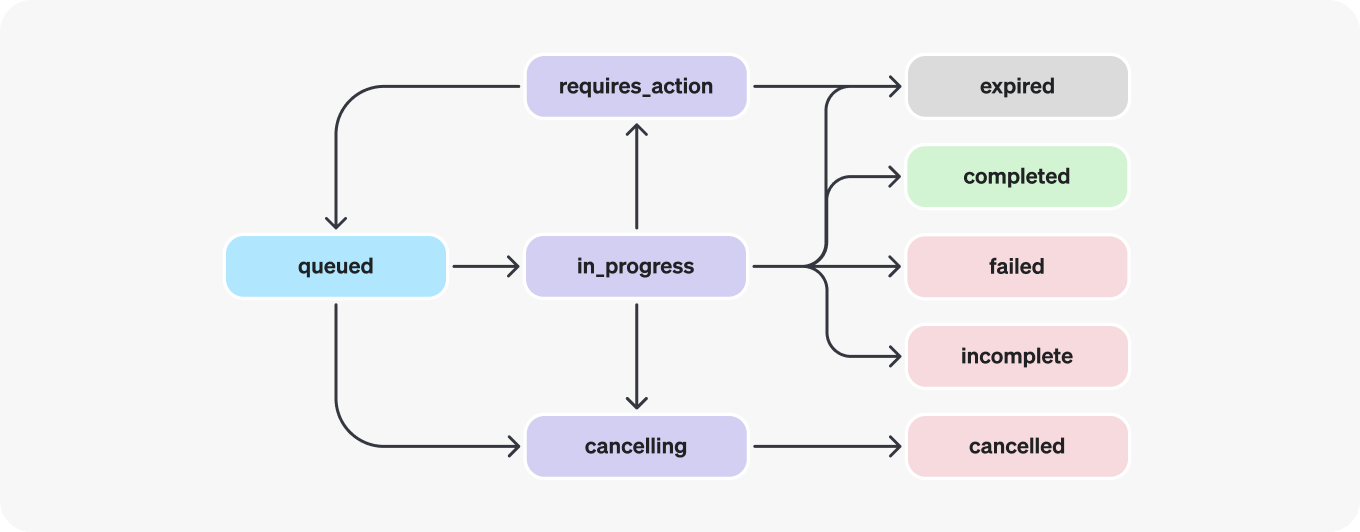
Figure 5‑11 Lifecycle of a run in the assistant framework
You may also want to list the Run Steps14 if you’d like to look at any tool calls made during this Run.
run_steps = client.beta.threads.runs.steps.list(
    thread_id=thread.id,
    run_id=run.id
)
for d in run_steps.data:
    print("Type: ",d.step_details.type)
    if d.step_details.type == 'message_creation':
        i = d.step_details.message_creation.message_id
        m = client.beta.threads.messages.retrieve(
            thread_id=thread.id,
            message_id=i
        )
        print(m.content[0].text.value)
    elif d.step_details.type == 'tool_calls':
        print(d.step_details.tool_calls[0].code_interpreter.input)
    print("------")
Type: message_creation
The solution to the equation \(3x + 11 = 14\) is \(x = 1\).
------
Type: tool_calls
from sympy import symbols, Eq, solve
x = symbols('x')
equation = Eq(3*x + 11, 14)
solution = solve(equation, x)
solution
------
Type: message_creation
Sure, I can help you solve the equation \(3x + 11 = 14\).
Let's start by isolating \(x\) on one side of the equation.
------
Code Interpreter and Data Analyst
On March 23rd of 2023, OpenAI announced ChatGPT Plugins. One of the main plugins, and the most interesting and intriguing for me was the code interpreter15. Plugins have since been retired16 in favor of the GPT store. And OpenAI introduced the assistant API as a way to create your own code interpreter.
Code Interpreter is priced at $0.03 / session. If your assistant calls Code Interpreter simultaneously in two different threads, this would create two Code Interpreter sessions (2 * $0.03). Each session is active by default for one hour, which means that you would only pay this fee once if your user keeps giving instructions to Code Interpreter in the same thread for up to one hour.
Files can either be passed at the Assistant level or the Thread level. Files that are passed at the Assistant level are accessible by all Runs with this Assistant. Whereas file passed to the thread are only accessible in the specific Thread.
Upload the File using the File upload17 endpoint and then pass the File ID as part of the Message creation request:
The Data Analyst GPT is accessible through the GPT Store in ChatGPT:
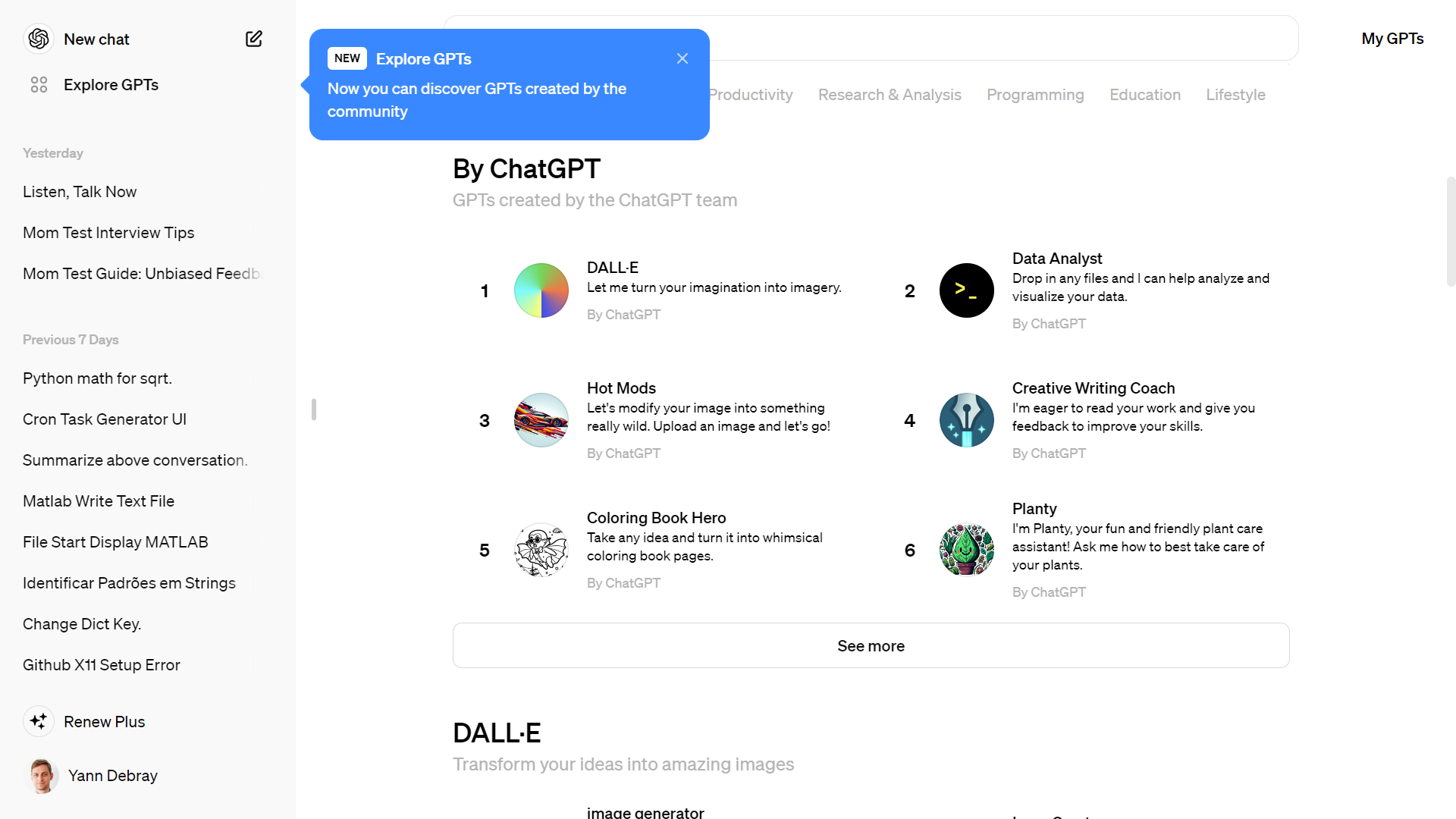
Figure 5‑12 Meet the Data Analyst GPT
But you can create your own with the Code Interpreter tool of the assistant API.
Here is an example with the Titanic dataset18:
from openai import OpenAI
client = OpenAI()
analyst = client.beta.assistants.create(
  name="Data Analyst",
  instructions="You are a data analyst. When asked a question, write and run code to answer the question.",
  model="gpt-4-turbo",
  tools=[{"type": "code_interpreter"}]
)

file = client.files.create(
  file=open("titanic.csv", "rb"),
  purpose='assistants'
)
file.id
'file-vSBcoeH1Z8jQjWj87LPgkecl'
thread = client.beta.threads.create()
message = client.beta.threads.messages.create(
  thread_id=thread.id,
  role="user",
  content="What is the average age of passengers on the Titanic?",
  attachments=[
    {"file_id": file.id,
     "tools": [{"type": "code_interpreter"}]}
  ]
)
run = client.beta.threads.runs.create_and_poll(
  thread_id=thread.id,
  assistant_id=analyst.id,
)
if run.status == 'completed':
  messages = client.beta.threads.messages.list(
    thread_id=thread.id
  )
  print(messages.data[0].content[0].text.value)
The average age of passengers on the Titanic was approximately 29.7 years.
for m in messages.data[::-1]:
    # Print message content in reversed order as they pile up
    print(m.content[0].text.value)
What is the average age of passengers on the Titanic?
To calculate the average age of passengers on the Titanic, I need to first inspect and load the data from the provided file. Let's start by checking the file format and then I'll proceed to calculate the average age.
The data includes an "Age" column, which we will use to calculate the average age of the passengers on the Titanic. Let's calculate this average now.
The average age of passengers on the Titanic was approximately 29.7 years.
run_steps = client.beta.threads.runs.steps.list(
    thread_id=thread.id,
    run_id=run.id
)

for d in run_steps.data[::-1]:
    if d.step_details.type == 'tool_calls':
        print(d.step_details.tool_calls[0].code_interpreter.input)
import pandas as pd

file_path = '/mnt/data/file-vSBcoeH1Z8jQjWj87LPgkecl'
data = pd.read_csv(file_path)

data.head(), data.columns

average_age = data['Age'].mean()
average_age
You can also implement reading images and files generated by Code Interpreter
analyst_id = 'asst_somL5t4D3BKYer05lZgcmdY3'
client.beta.assistants.retrieve(analyst_id)


thread = client.beta.threads.create()
message = client.beta.threads.messages.create(
  thread_id=thread.id, role="user", content=prompt)
run=client.beta.threads.runs.create_and_poll(thread_id=thread.id,assistant_id=analyst_id)
if run.status == 'completed':
  messages = client.beta.threads.messages.list(thread_id=thread.id)
dict(messages.data[0])
{'id': 'msg_QhJN8P6cZJSZgidYNyjwdkwe',
'assistant_id': 'asst_somL5t4D3BKYer05lZgcmdY3',
'attachments': [],
'completed_at': None,
'content': [ImageFileContentBlock(image_file=ImageFile(file_id='file-8UVyWuiKqB3ALtIF0h8sAewt'), type='image_file'),
TextContentBlock(text=Text(annotations=[], value="Here is the plot of the function \\(\\frac{1}{\\sin(x)}\\) over the range from \\(-2\\pi\\) to \\(2\\pi\\). I've limited the y-axis to the range \\([-10, 10]\\) to keep the plot visually informative, especially around values where the sine function approaches zero and the function \\(\\frac{1}{\\sin(x)}\\) approaches infinity."), type='text')],
'created_at': 1714948943,
'incomplete_at': None,
'incomplete_details': None,
'metadata': {},
'object': 'thread.message',
'role': 'assistant',
'run_id': 'run_tO0e1vGKvMHAU86kvB5LKoom',
'status': None,
'thread_id': 'thread_iHrMsStk78Sz80CL9KCdhVvh'}
from IPython.display import Image
for c in messages.data[0].content:
    if c.type == 'image_file':
        image_data = client.files.content(c.image_file.file_id)
        image_data_bytes = image_data.read()
Image(image_data_bytes)
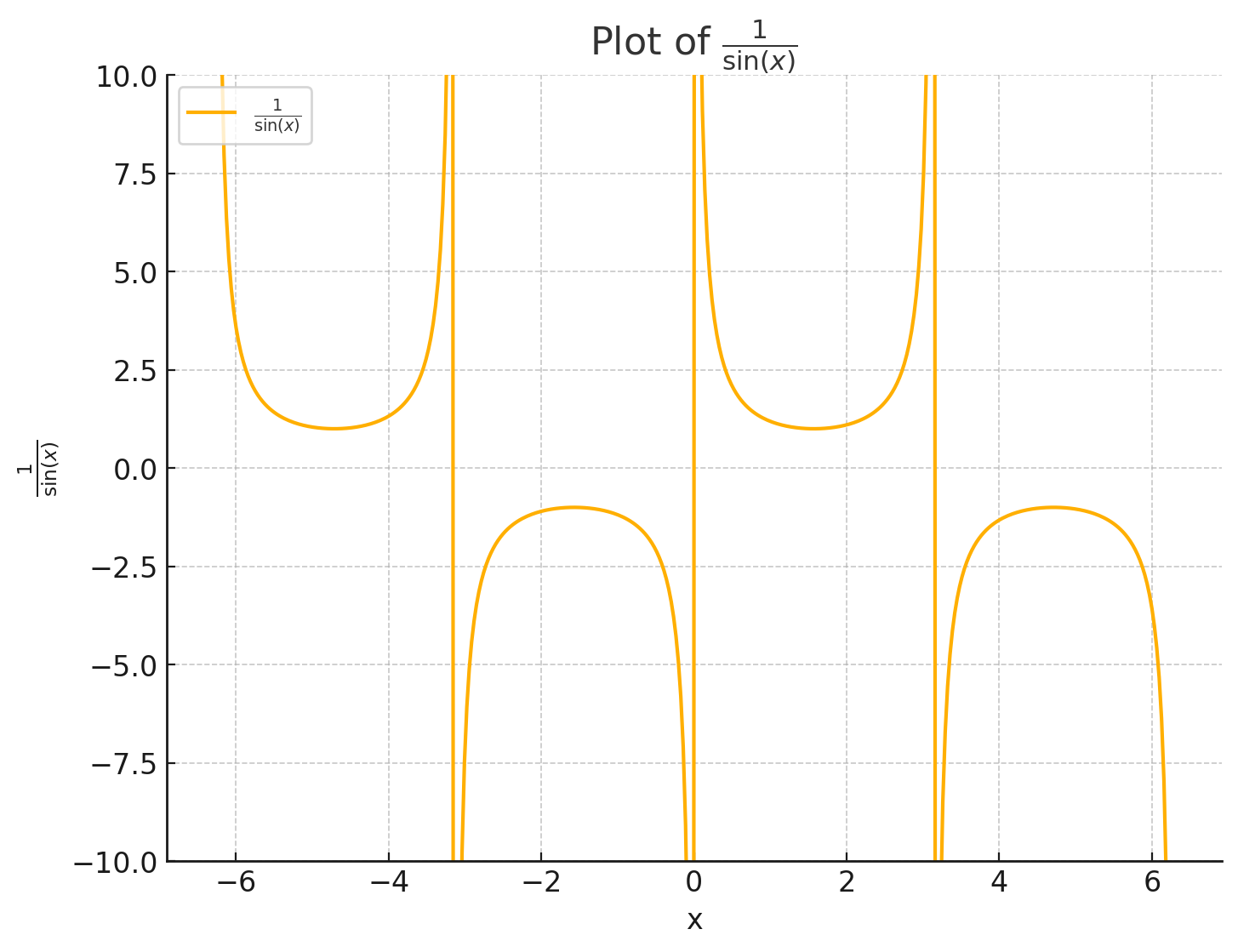
Figure 5‑13 Plot generated by the Code Interpreter
File Search
File search (previously called Retrieval in the API V1) implements the notion of RAG (Retrieval Augmented Generation) as a service19.
The file_search tool implements several retrieval best practices out of the box to help you extract the right data from your files to augment the model’s responses.
By default, the file_search tool uses the following settings:
-
Chunk size: 800 tokens
-
Chunk overlap: 400 tokens
-
Embedding model: text-embedding-3-large at 256 dimensions
-
Maximum number of chunks added to context: 20
The restrictions for uploading a File are:
-
512 MB per file
-
5M tokens per file
-
10k files per vector store
-
1 vector store per assistant
-
1 vector store per thread
The overall storage limit for an org is limited to 100 GB.
File Search is priced at $0.10/GB of vector store storage per day (the first GB of storage is free). The size of the vector store is based on the resulting size of the vector store once your file is parsed, chunked, and embedded.
The last element that needs to be covered is File management. In this example, we’ll create an assistant that can help answer questions about the previous chapters.
- Step 1: Create a new Assistant with File Search Enabled
Create a new assistant with file_search enabled in the tools parameter of the Assistant.
from openai import OpenAI

client = OpenAI()

assistant = client.beta.assistants.create(
  name="Vector search expert",
  instructions="You are an expert about Vector search",
  model="gpt-4-turbo",
  tools=[{"type": "file_search"}],
)
Once the file_search tool is enabled, the model decides when to retrieve content based on user messages.
- Step 2: Upload files and add them to a Vector Store
To access your files, the file_search tool uses the Vector Store object. Upload your files and create a Vector Store to contain them. Once the Vector Store is created, you should poll its status until all files are out of the in_progress state to ensure that all content has finished processing. The SDK provides helpers to uploading and polling in one shot.
vector_store = client.beta.vector_stores.create(name="Vector search chapter")
file_paths = ["../chap4/Chap 4 - Vector search & Question Answering.pdf"]
file_streams = [open(path, "rb") for path in file_paths]

file_batch = client.beta.vector_stores.file_batches.upload_and_poll(
  vector_store_id=vector_store.id, files=file_streams
)

print(file_batch.status)
print(file_batch.file_counts)
completed
FileCounts(cancelled=0, completed=1, failed=0, in_progress=0, total=1)
- Step 3: Update the assistant to to use the new Vector Store
To make the files accessible to your assistant, update the assistant’s tool_resources with the new vector_store id.
assistant = client.beta.assistants.update(
  assistant_id=assistant.id,
  tool_resources={"file_search":{"vector_store_ids": [vector_store.id]}},
)
- Step 4: Create a thread
You can also attach files as Message attachments on your thread. Doing so will create another vector_store associated with the thread, or, if there is already a vector store attached to this thread, attach the new files to the existing thread vector store. When you create a Run on this thread, the file search tool will query both the vector_store from your assistant and the vector_store on the thread.
message_file = client.files.create(
  file=open("../chap3/Chap 3 - Chaining & Summarization.pdf", "rb"), purpose="assistants"
)


thread = client.beta.threads.create(
  messages=[
    {
      "role": "user",
      "content": prompt,
      # Attach the new file to the message.
      "attachments": [
        { "file_id": message_file.id, "tools": [{"type": "file_search"}] }
      ],
    }
  ]
)


print(thread.tool_resources.file_search)
ToolResourcesFileSearch(vector_store_ids=['vs_ulgeT4pn8fzb5wJYebXivJHo'])
Vector stores created using message attachments have a default expiration policy of 7 days after they were last active (defined as the last time the vector store was part of a run). This default exists to help you manage your vector storage costs. You can override these expiration policies at any time. Learn more here.
- Step 5: Create a run and check the output
Now, create a Run and observe that the model uses the File Search tool to provide a response to the user’s question.
run = client.beta.threads.runs.create_and_poll(
    thread_id=thread.id, assistant_id=assistant.id
)
messages = list(client.beta.threads.messages.list(thread_id=thread.id, run_id=run.id))
message_content = messages[0].content[0].text
annotations = message_content.annotations
citations = []
for index, annotation in enumerate(annotations):
    message_content.value = message_content.value.replace(annotation.text, f"[{index}]")
    if file_citation := getattr(annotation, "file_citation", None):
        cited_file = client.files.retrieve(file_citation.file_id)
        citations.append(f"[{index}] {cited_file.filename}")
print(message_content.value)
print("\n".join(citations))
Vector search, also known as semantic search or approximate search, is a search method that uses vector embeddings to represent the content in a multi-dimensional space. This technique allows the system to understand and measure the semantic similarity between queries and documents, rather than relying solely on keyword matching.
In vector search, both the search queries and the items in the database (such as documents, images, or products) are converted into vectors using models like word embeddings or neural networks. The similarity between the query vector and document vectors is then computed using a distance measure such as cosine similarity. Items that are closer to the query vector in this vector space are considered more relevant to the query.
This approach enables more nuanced and context-aware search results because it can capture the underlying meanings and relationships of words and phrases, rather than just their surface representations. Vector search is commonly used in various applications, including search engines, recommendation systems, and data retrieval systems.
You can read more about Vector Store in the assistant API documentation20.
| ⬅️ Vector search & Question Answering | 🏠 Home | Speech-to-Text and Text-to-Speech ➡️ |
-
Sparks of Artificial General Intelligence: Early experiments with GPT-4: https://arxiv.org/abs/2303.12712 ↩
-
Tuana Celik: Building LLM-based Agents: https://www.youtube.com/watch?v=LP8c9Vu9mOQ ↩
-
Scrape Google Search result to enhance GPT-3: https://serpapi.com/blog/up-to-date-gpt-3-info-with/ ↩
-
LangChain agents quickstart: https://python.langchain.com/docs/modules/agents/quick_start/ ↩
-
https://haystack.deepset.ai/blog/introducing-haystack-agents ↩
-
https://colab.research.google.com/github/deepset-ai/haystack-tutorials/blob/main/tutorials/23_Answering_Multihop_Questions_with_Agents.ipynb ↩
-
https://openai.com/blog/function-calling-and-other-api-updates ↩
-
OpenAI Assistant dashboard: https://platform.openai.com/assistants ↩
-
Assistants in the OpenAI playground: https://platform.openai.com/playground/assistants ↩
-
https://platform.openai.com/docs/assistants/how-it-works/run-lifecycle ↩
-
https://platform.openai.com/docs/api-reference/run-steps/listRunSteps ↩
-
https://help.openai.com/en/articles/8988022-winding-down-the-chatgpt-plugins-beta ↩
-
https://platform.openai.com/docs/api-reference/files/create ↩
-
OpenAI File Search default tool: https://platform.openai.com/docs/assistants/tools/file-search ↩
-
OpenAI Vector Store doc: https://platform.openai.com/docs/assistants/tools/file-search/vector-stores ↩